Aerox 3 Review: Real User Experience After 3 Months
I still remember the day I decided to swap out my reliable but heavy productivity mouse for something that promised to be faster and more agile. I had seen the trends leaning toward ultra-lightweight gaming mice, but I was skeptical. How much could a few dozen grams really matter? After spending three full months with the SteelSeries Aerox 3 as my primary driver for both competitive gaming and twelve-hour workdays, I finally have the answer. This wasn't just a change in equipment; it was a shift in how I interact with my desk setup.
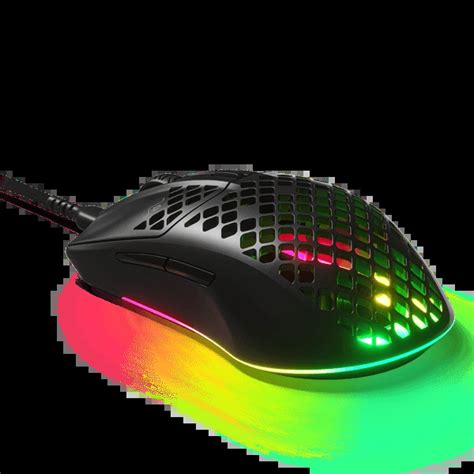
When I first pulled the Aerox 3 out of its box, I was struck by the honeycomb shell. It felt like holding a piece of high-tech lace rather than a gaming peripheral. I’ve lived with this mouse through intense late-night sessions of Counter-Strike, endless spreadsheets, and the daily grind of digital life. I’ve seen how the dust accumulates, how the battery holds up under pressure, and how the clicks feel after millions of actuations. This is my honest, long-term deep dive into what it is actually like to live with the Aerox 3.
The First Impressions vs. Three-Month Reality
In the first week, I was obsessed with the weight. Coming from a mouse that weighed over 100 grams, the 59-gram (wired version) or 68-gram (wireless) chassis felt almost toy-like. I found myself overshooting targets in games because my muscle memory was still compensated for inertia that no longer existed. However, after the first month, that lightness became my new baseline. Now, when I pick up a standard mouse, it feels like I’m dragging a brick across my mousepad.
The biggest concern I had initially was the "open-air" design. I was terrified that a single spill or even just the ambient humidity of my office would fry the electronics. SteelSeries touts their AquaBarrier technology with an IP54 rating, and after three months, I can say it has held up. I haven't dumped a glass of water on it, but I have used it with slightly damp hands and in a dusty environment without a single flicker of malfunction. The peace of mind that comes from knowing the internals are coated against the elements is something I didn't realize I needed until I had it.
Design and Ergonomics: A Delicate Balance
The Aerox 3 uses a symmetrical shape, which I found to be quite versatile for different grip styles. I personally use a hybrid between a claw and fingertip grip, and for my medium-sized hands, the mouse feels like a natural extension of my palm. The low profile was something I had to get used to, though. If you are a dedicated palm-gripper with large hands, you might find your fingers dragging along the mousepad unless you adjust your positioning.
One thing that bothered me during the second month was the scroll wheel. While it is tactile and has distinct steps—which I appreciate for switching weapons in-game—it developed a very slight squeak about six weeks in. It wasn't loud enough for anyone else to hear, but in a quiet room, I noticed it. Curiously, the squeak disappeared on its own after another two weeks of heavy use, suggesting it just needed a "break-in" period. The side buttons are another point of contention for me. They are quite slim, which looks great visually, but I found them a bit difficult to "find" with my thumb during high-stress moments. I eventually developed the muscle memory for them, but they aren't as chunky or satisfying as the side buttons on some of the larger, heavier mice I’ve used in the past.
Performance: Tracking and Click Feel
In my experience, the sensor performance is where the Aerox 3 justifies its existence. Whether I was doing precise photo editing or flicking to a target in an FPS, the tracking felt 1-to-1. I never experienced any spin-outs or jitter. What I found particularly impressive was the liftoff distance. I play on a relatively low sensitivity, which means I'm constantly lifting the mouse and resetting it on the pad. The Aerox 3 cuts off tracking almost instantly when lifted, which prevented those annoying crosshair jumps that plague lesser sensors.
The clicks are powered by Golden Micro IP54 switches. Every time I press down, there is a snappy, mechanical feedback that hasn't degraded after three months. I’ve put roughly 500 hours of active use into this mouse, and the primary buttons feel just as crisp as they did on day one. There is no "mushiness" or pre-travel that I can detect. This consistent tactile feedback is crucial for me because it builds a level of trust with the device; I know exactly when my action is going to register.
Discover deals on Electronics — updated daily.
View Offers →Connectivity and Battery Life
Since I opted for the wireless version, I was keenly aware of the battery performance. I noticed that the advertised battery life of up to 200 hours is a bit optimistic if you like your RGB lighting. In my testing, with the lighting set to a modest "breathe" effect at 50% brightness, I was getting about a week and a half of heavy use before the scroll wheel started flashing red. The good news is the charging speed. I was surprised by how quickly it juices back up via the USB-C port. Ten or fifteen minutes of charging while I went to grab a coffee usually gave me enough power to finish my workday and a evening gaming session.
The inclusion of both 2.4GHz wireless and Bluetooth 5.0 is a feature I didn't think I'd use, but I ended up loving it. I keep the 2.4GHz dongle plugged into my gaming PC for low-latency performance, but I can flip a switch on the bottom of the mouse to pair it with my laptop for work via Bluetooth. This versatility made it my de-facto travel mouse as well, as I didn't have to worry about bringing the dongle everywhere.
Maintenance and Longevity
After three months, the most common question I get is: "How dirty does it get?" With the hole-filled design, it seems like a magnet for dust and skin cells. I found that if I stayed on top of it, it wasn't an issue. Once a week, I would use a can of compressed air to blow out the interior. This kept it looking pristine. However, I did notice that the matte finish on the primary buttons started to develop a slight "shine" where my fingers rest. This is common with ABS plastic, but I was hoping it would stay matte a bit longer. It doesn't affect the grip, but it is a visual indicator of the heavy use it has seen.
The PTFE feet (the glides on the bottom) have held up remarkably well. I use a hybrid cloth/plastic mousepad, and while there are some visible scratches on the feet now, the glide remains smooth and consistent. They haven't started peeling or fraying at the edges, which is a problem I’ve had with other "pro" level mice in the past.
Pros and Cons
- Extremely Lightweight: At under 70 grams for the wireless version, it significantly reduces wrist fatigue during long sessions.
- Dual Connectivity: The ability to swap between 2.4GHz and Bluetooth makes it a fantastic multi-device tool.
- Weather Resistance: The IP54 rating gives me confidence that the exposed internals are protected from moisture and dust.
- USB-C Charging: Fast charging and a modern connector mean no more hunting for old micro-USB cables.
- Crisp Switches: The mechanical clicks are satisfying and have remained consistent over several months.
- Thin Side Buttons: The side buttons can be difficult to actuate quickly due to their small surface area.
- Battery Life with RGB: To get the best battery performance, you really have to turn the lighting off or very low.
- Shell Maintenance: You will definitely need a can of compressed air to keep the interior looking clean over time.
Technical Feature Comparison
| Feature | Aerox 3 Wireless | Aerox 3 Wired | Typical Gaming Mouse |
|---|---|---|---|
| Weight | 68g | 59g | 85g - 110g |
| Sensor Type | TrueMove Air (Optical) | TrueMove Core (Optical) | Generic Optical |
| IP Rating | IP54 | IP54 | None |
| Connectivity | 2.4GHz / BT 5.0 / USB-C | USB-C to USB-A | USB-A Wired |
| Switch Life | 80M Clicks | 80M Clicks | 20M - 50M Clicks |
Buying Guide: Is the Aerox 3 Right for You?
Choosing a mouse is a deeply personal decision, and after three months of testing, I’ve identified a few key factors that should determine if you pick this one up. First, consider your hand size and grip style. If you have very large hands and prefer to rest your entire palm on the mouse, the Aerox 3's low-profile, shorter body might feel cramped. However, for claw and fingertip users, it is almost perfect. The center of gravity is well-balanced, which is essential for a mouse this light.
Second, think about your environment. If you work or play in a particularly dusty area, the open-shell design requires a commitment to cleaning. While the electronics are protected, seeing dust buildup inside a translucent RGB-lit mouse is not a great look. If you are a "set it and forget it" person who never cleans their peripherals, you might find the maintenance level an annoying extra step.
Finally, consider the cable. Even if you buy the wireless version, you’ll be using the cable to charge. SteelSeries includes a "Super Mesh" cable which I found to be surprisingly flexible. It doesn't have that stiff, rubbery feel that creates "cable drag." In fact, during the few times I forgot to charge the mouse and had to use it wired, I barely noticed the difference in movement. If you are on a budget and don't care about wireless, the wired Aerox 3 is even lighter and offers nearly identical performance at a much lower price point.
Shop the latest Electronics picks on Amazon.
See Deals →Real-World Challenges and Disappointments
It wouldn't be an honest review if I didn't mention the things that frustrated me. Documentation for the software was a bit thin. The SteelSeries GG software is powerful—allowing for deep customization of the RGB zones and sensor settings—but it can be a bit overwhelming and resource-heavy on your system. I noticed that it likes to run several background processes that I didn't feel were necessary for just a mouse driver. I ended up setting my preferred CPI (DPI) and lighting profiles to the onboard memory and then disabling the software from starting with Windows.
Another minor disappointment was the RGB lighting itself. While the three zones look beautiful through the honeycomb shell, they can be a bit patchy. If you look closely, you can see the individual LED hotspots rather than a perfectly smooth glow. This is a common issue with lightweight mice where there isn't much room for light diffusers, but after seeing some of the competitors' implementations, I feel SteelSeries could have made the light spread a bit more uniform.
I also experienced one instance where the 2.4GHz connection suffered from interference. I had my router sitting just two feet away from my mousepad, and I noticed a slight stutter. Moving the wireless dongle to a front-panel USB port (using the included extension adapter) fixed the issue immediately. This is a reminder that no matter how good the wireless technology is, it is still subject to the laws of physics and signal congestion.
The Evolution of My Setup
After three months, the Aerox 3 has fundamentally changed my expectations for a desktop peripheral. I’ve realized that weight is a major factor in long-term comfort. Before this, I would often have a dull ache in my wrist after a long Friday night of gaming following a full workday. That ache has largely vanished. The lack of resistance from both the weight and the high-quality glides means I’m using less force for every movement, which adds up to thousands of pounds of less "work" for my hand over the course of a month.
I also found that I became more precise. There’s a theory that lighter mice allow for better "micro-adjustments," and I’ve found this to be true in my experience. When I’m trying to select a single pixel in a photo or line up a long-distance shot in a game, I’m not fighting against the mouse’s own weight to get it moving. It just goes where I want it to, exactly when I want it to.
Conclusion
Living with the Aerox 3 for three months has been a journey of adaptation. I went from being a skeptic of the ultra-lightweight trend to a firm believer. While it isn't a perfect device—the thin side buttons and the maintenance requirements for the open shell are genuine trade-offs—the performance and comfort gains are undeniable. The combination of a top-tier sensor, incredible weight savings, and the robust IP54 protection makes it a standout in a crowded market. If you are looking to lighten your load and want a mouse that can seamlessly transition from a high-stakes gaming arena to a professional workspace, this is a choice that feels both futuristic and practical. It has earned its permanent spot on my desk, and I don't see myself going back to a heavy mouse anytime soon.