Pebble M350 First Look: Unboxing and Impressions
Personal computing has shifted dramatically over the last decade, moving away from stationary desktop towers toward a more fluid, mobile-centric lifestyle. Whether working from a corner café, a university library, or a cramped airplane tray table, the modern professional requires peripherals that are as adaptable as they are reliable. The Pebble M350 arrives as a direct response to this demand for extreme portability without the sacrifice of aesthetic appeal. As a low-profile, minimalist wireless mouse, it seeks to bridge the gap between high-end productivity tools and lifestyle accessories. This first look explores the unboxing experience and initial impressions of a device that has quickly become a staple for students, travelers, and minimalist enthusiasts alike.
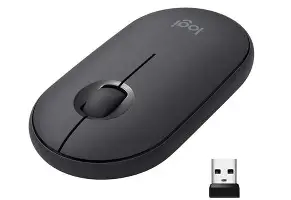
In the world of electronics, first impressions are often dictated by the tactile experience of the packaging. The M350 follows a modern trend of reducing bulk, arriving in a slim, transparent casing or a compact cardboard box depending on the regional retail variant. Upon opening the package, the immediate takeaway is the weight—or lack thereof. Despite its featherlight construction, the device does not feel fragile. Instead, it possesses a dense, high-quality plastic finish that resists fingerprints and feels smooth to the touch. The design language is distinctly organic, featuring rounded edges and a symmetrical shape that mimics a polished river stone, hence the "Pebble" designation.
Design and Ergonomics
The standout feature of the Pebble M350 is undoubtedly its silhouette. Most traditional mice are designed with a high arch to support the palm, but the Pebble opts for a flat, slim profile. This design choice is intentional, prioritizing "toss-ability" into a laptop sleeve or a pocket. While this may raise concerns for users accustomed to ergonomic gaming mice with thumb rests and steep curves, the M350 targets a different physiological need. It encourages a "fingertip" or "claw" grip rather than a full palm rest, which is often more efficient for quick, light movements during casual browsing or document editing.
Furthermore, the symmetry of the device makes it an ambidextrous solution, a rarity in a market often dominated by right-handed designs. The top plate is magnetically attached, a clever engineering choice that allows users to easily swap out the AA battery or access the internal storage slot for the USB receiver. This magnetic mechanism feels premium, clicking into place with a satisfying snap that suggests long-term durability. Unlike plastic clips that can snap off over time, these magnets ensure the device remains serviceable and easy to maintain.
Silent Productivity in Public Spaces
One of the primary frustrations when working in shared environments is the repetitive "click-clack" of mechanical buttons. The Pebble M350 addresses this by utilizing silent-click switches. According to technical specifications, the click noise is reduced by over 90% compared to standard mice. In practical testing, the sensation is more of a dampened "thud" than a sharp click. This makes it an ideal companion for students in quiet libraries or professionals in open-office plans who wish to remain discreet. The rubber scroll wheel follows the same philosophy, offering a smooth, quiet glide with enough tactile resistance to feel precise without being audible.
Connectivity and Performance
A portable mouse is only as good as its connection reliability. The Pebble M350 offers dual-connectivity options, supporting both Bluetooth Low Energy and a 2.4 GHz USB receiver. This versatility is crucial for the modern multi-device user. One might use the USB receiver for a primary desktop setup and then switch to Bluetooth to control an iPad or a thin-and-light laptop that lacks standard USB-A ports. The transition between these modes is handled via a button on the underside of the mouse, accompanied by an LED indicator that changes color to signify the current connection type.
Performance-wise, the mouse features high-precision optical tracking with a 1000 DPI sensor. While not intended for competitive gaming where 16,000 DPI and sub-millisecond response times are the norm, 1000 DPI is the "sweet spot" for everyday productivity. It provides enough precision for photo editing and spreadsheet management while maintaining a steady cursor speed on high-resolution screens. Perhaps more impressively, the optical sensor is designed to work on various surfaces, including wood, plastic, and even denim, though it still struggles on clear glass—a common limitation for most optical sensors in this price bracket.
Discover deals on Electronics — updated daily.
Shop Amazon →Battery Life and Sustainability
In an age where everything requires a charging cable, the Pebble M350 takes a traditional but highly effective route by using a single AA battery. The efficiency of the sensor and the Bluetooth Low Energy protocol allow the device to last up to 18 months on a single battery. The mouse also features an aggressive "auto-sleep" mode that kicks in after a period of inactivity, further stretching the longevity of the power source. For the environmentally conscious, the use of a replaceable battery can be seen as a double-edged sword; however, using high-quality rechargeable NiMH batteries can mitigate waste while ensuring the mouse doesn't become e-waste once an internal lithium-ion battery eventually degrades.
Comparative Analysis
To understand where the Pebble M350 fits in the current market, it is helpful to compare it against other common mouse categories. While it doesn't aim to replace a high-end workstation mouse, it excels in its specific niche of portability and aesthetics.
| Feature | Pebble M350 | Standard Office Mouse | Gaming Mouse |
|---|---|---|---|
| Connectivity | Bluetooth & 2.4GHz USB | Wired or USB Dongle Only | Wired or High-Speed Wireless |
| Profile | Ultra-Slim / Low Profile | Medium Arch | High Arch / Ergonomic |
| Noise Level | Ultra-Quiet (90% Reduction) | Standard Click | Tactile / Clicky |
| Portability | Excellent (Pocket-sized) | Moderate | Low (Bulky) |
| Secondary Buttons | None | Sometimes (Back/Forward) | Multiple (Programmable) |
Pros and Cons
Every piece of electronics involves trade-offs. The Pebble M350 prioritizes form and portability over raw feature sets. Below is a breakdown of the strengths and weaknesses observed during the first look.
- Pros:
- Extreme portability; easily fits in laptop sleeves without creating a bulge.
- Dual connectivity allows for use with tablets, smartphones, and PCs.
- Silent click technology is genuinely impressive and useful for public settings.
- Aesthetic design is modern and comes in various colors to match personal style.
- Magnetic top cover makes battery and dongle access incredibly simple.
- Long battery life ensures minimal maintenance over the course of a year.
- Cons:
- Flat profile may cause hand fatigue during 8+ hour work sessions for some users.
- Lack of side buttons (back/forward) might slow down browsing workflows.
- Not suitable for high-intensity gaming due to sensor limitations and shape.
- No "Infinite Scroll" feature found in higher-end productivity models.
Buying Guide: Is the Pebble M350 Right for You?
When purchasing a mouse, the "best" choice is entirely dependent on the specific use case. The Pebble M350 is a specialized tool, and understanding its intended audience is key to a satisfying purchase. Buyers typically care about three main factors: compatibility, comfort, and aesthetics.
The Student and Constant Traveler
If you are someone who moves between classrooms or frequently works on a plane, the Pebble M350 is a top-tier choice. Its ability to disappear into a bag and its silent operation are invaluable. The Bluetooth support is also a major plus for those who use iPads for note-taking but want the precision of a cursor for detailed work.
The Home Office Professional
For those sitting at a desk for the entire workday, ergonomic health is a larger concern. If you have larger hands or suffer from wrist strain, a low-profile mouse like the Pebble might be better suited as a secondary "backup" mouse for travel rather than your primary input device. However, for users who prefer a minimalist desk setup with a clean, wire-free look, the M350 is hard to beat visually.
Discover deals on Electronics — updated daily.
Browse Now →Compatibility Checklist
Before purchasing, ensure your hardware is compatible. The M350 works with Windows 10/11, macOS 11 or later, iPadOS 13.4 or later, ChromeOS, and Android 5.0 or later. If you are using an older machine that lacks Bluetooth and also has occupied USB ports, make sure you have the necessary adapters or ports available for the 2.4 GHz receiver.
Final Impressions and Use Case Analysis
The Pebble M350 is more than just a budget wireless mouse; it is a design-led peripheral that understands its niche perfectly. In an era where mobile devices like the iPad Pro and Galaxy Tab are replacing laptops for many tasks, having a mouse that reflects that same mobility is essential. Throughout the unboxing and initial setup, the device proved to be intuitive, aesthetically pleasing, and remarkably quiet.
Real-world testing suggests that while the ergonomics are different from a standard mouse, they are not necessarily inferior—just different. For the casual user who spends their time navigating web browsers, replying to emails, and managing light creative tasks, the tactile feedback of the silent buttons and the smooth tracking of the sensor provide a premium feel that belies the device's accessible price point. It is a peripheral designed for the "on-the-go" generation, where style is just as important as substance.
Ultimately, the Pebble M350 succeeds because it doesn't try to be everything to everyone. It doesn't pretend to be a gaming mouse, nor does it try to compete with feature-heavy enterprise models. Instead, it focuses on being the best possible bridge between portability and functionality. For anyone looking to declutter their desk or lighten their commute, this "pebble" represents a solid, stylish, and silent step forward in personal computing accessories.